

Use one of these options to add reports received by third parties.
You can add reports from external sources in the following ways:
Forward Reports via email
If a report has been sent to you via email, you can forward it directly to your dedicated inbound email address.
For more information, see: Can I accept email reports from other sources?
Manually create cases
Go to the Cases view.
Select + Create.
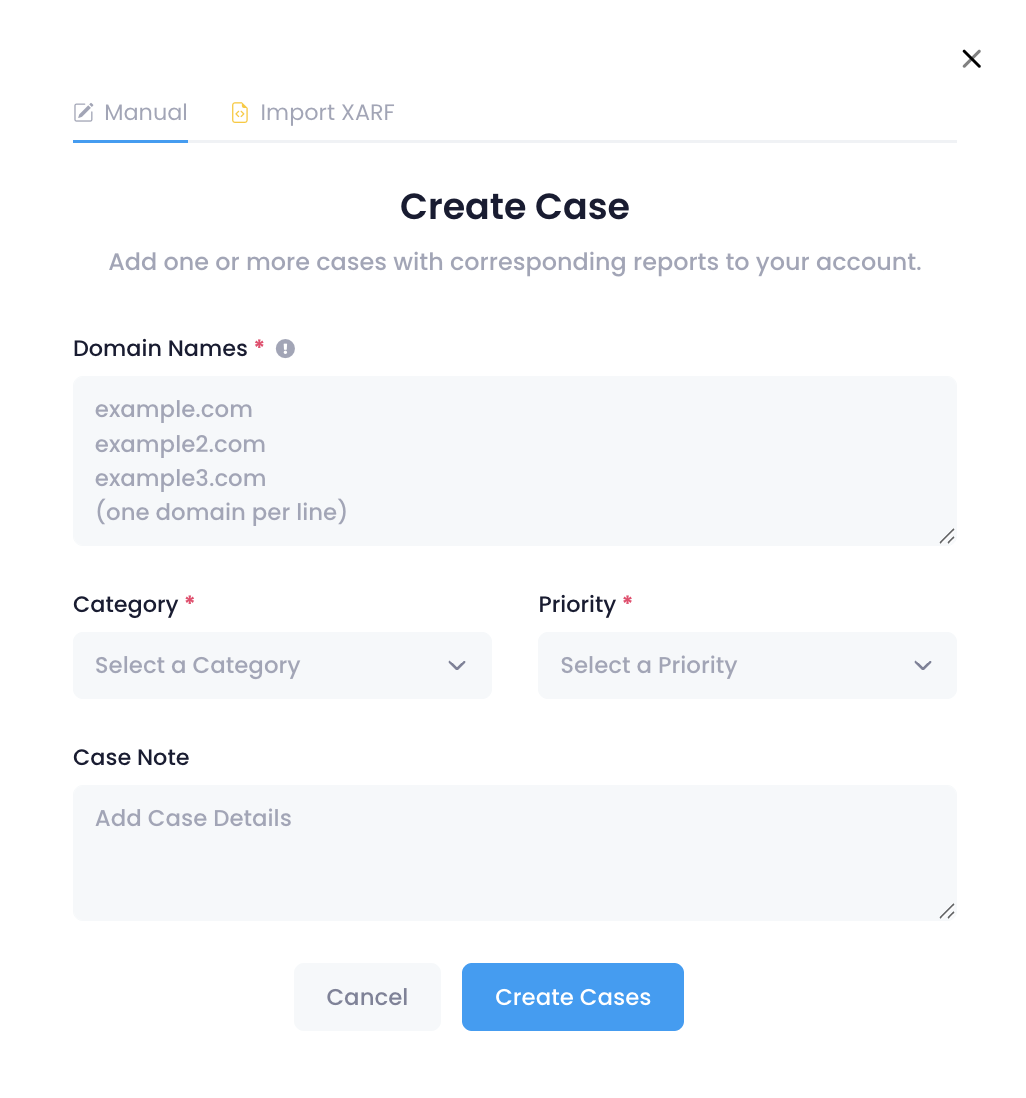
In the Create Case dialog, enter the domain names (one per line) in the Domain Names field.
Do not include prefixes such as
www,http://, orhttps://.You can add up to 2,500 domain names at once.
Select a Category and Priority, and add any relevant Notes.
Select Create Case.
A separate case will be created for each domain entered.
Import a XARF report
To import a XARF report, follow these instructions: Do you support XARF?
Add a trusted reporter (API)
If an external party (eg. a security vendor, CERT, anti-phishing organisation) sends you reports regularly, you can give them a dedicated API key instead of receiving reports by email. They can then submit reports directly into your case pipeline without needing a full user account. See How to Set Up Reporters.
Connect NetBeacon Reporter
If your reports come through the NetBeacon Institute's NetBeacon Reporter, iQ can channel those standardised reports directly into your case pipeline too. This integration is activated by iQ, not configured by you directly. See How do I enable the NetBeacon Reporter integration? for details.